
What are the different image file formats, and which one should you use? JPEG (JPG) is a reliable choice for photos, PNG preserves sharp graphics and transparency, GIF is familiar for looping animations, and WebP or AVIF can be useful for efficient website images. But what about SVG, HEIC, TIFF, RAW, and the many other file types you encounter?
The answer is that image formats were created for different purposes. Some prioritize smaller files, some preserve every pixel, while others support animation, scalable graphics, professional editing, or long-term storage.
In this guide, we'll compare 14 image formats and format families, explain where they came from, explore their advantages and limitations, and help you choose the right format for photographs, websites, logos, animations, and creative work. Start with the quick comparison chart, then discover the stories behind the formats we still use today.
Which image file format should you use? A quick comparison
| Image format | Common extension | Where it makes sense | Main consideration |
|---|---|---|---|
| JPEG / JPG | .jpg, .jpeg | Everyday photographs, sharing, broad compatibility | Typically lossy; no standard alpha transparency |
| PNG | .png | Screenshots, diagrams, transparent graphics | Lossless, but can be large for photographs |
| GIF | .gif | Familiar short looping graphics | Palette-based colors; often inefficient for complex animation |
| WebP | .webp | Modern website photos and graphics; some animations | Check the destination's support and export settings |
| AVIF | .avif | Efficient modern web imagery, HDR-capable workflows | Encoding and workflow compatibility can vary |
| SVG | .svg | Vector logos, icons, interface diagrams | Vector graphics, not an ordinary raster photograph |
| HEIC / HEIF | .heic, .heif | Efficient photo storage on compatible devices | Some apps and upload forms still need JPEG conversion |
| TIFF | .tif, .tiff | Scanning, professional imaging and print handoffs | Often large; not a general web delivery choice |
| BMP | .bmp | Older Windows and software workflows | Often bulky and not an ideal web sharing format |
| Camera RAW / DNG | .dng, .cr3, .nef, .arw, etc. | Photographic capture and detailed editing | A family of camera files, not one universal format |
| PSD | .psd | Editable Photoshop projects with layers and masks | A working document, not a universal viewing format |
| APNG | .apng, sometimes .png | Lossless animated graphics with nuanced transparency | Animation support depends on the receiving workflow |
| JPEG XL | .jxl | Advanced image storage and compatible modern pipelines | Check actual application/browser support before delivery |
| ICO | .ico | Windows application icons and legacy favicons | Specialized icon container, not a normal photo format |
Quick rule: Choose around the job, not around a supposed universal winner. Also distinguish lossless vs. lossy encoding, raster vs. vector graphics, and working files vs. delivery files. A format's capabilities do not guarantee that every app supports them.
What is an image file format, exactly?
An image file format tells software how to store and interpret visual information. Some formats describe a raster image: a grid of colored pixels. JPEG, PNG, GIF, WebP, AVIF, TIFF, BMP and HEIC typically hold raster imagery. Others describe vector artwork, such as SVG, using geometric shapes and instructions that can scale without the same fixed-pixel limitations.
Not everything on the list is the same kind of thing. Camera RAW is a family of capture-oriented formats; DNG is one member of that world. PSD is a Photoshop editing document that can preserve layers and masks. ICO can package multiple icon sizes. And APNG is an animated form of PNG, not a completely unrelated invention.
These distinctions matter because an image can have excellent visible quality yet be unsuitable for uploading, printing, editing, or animating in a particular program. Dimensions are another decision: our guide to resizing product images without stretching covers that separate step.
Where did these image formats come from? A short history
The history of image file types is also a history of changing computer needs.
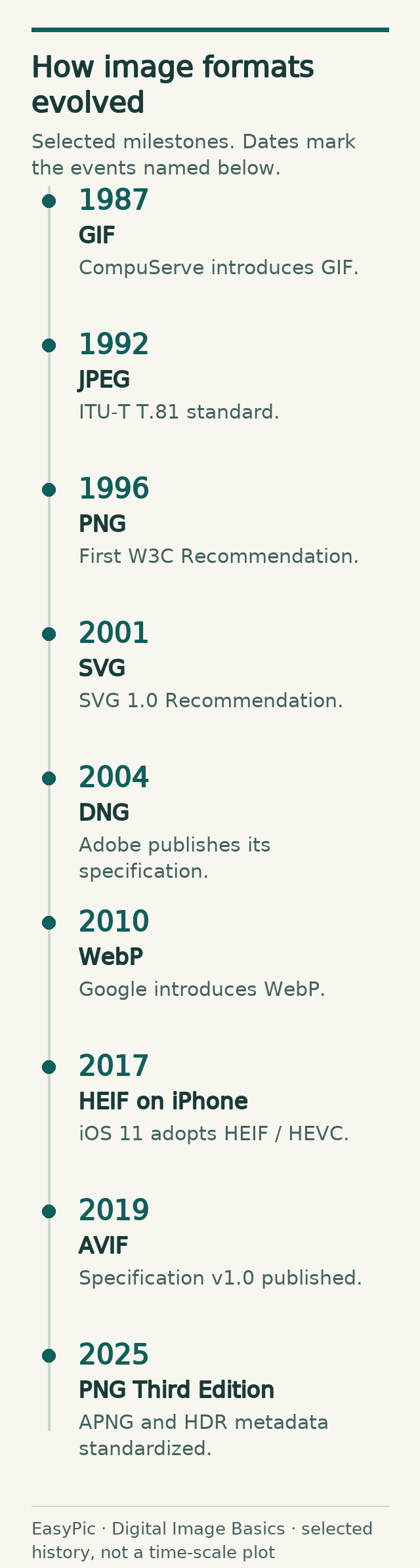
- The 1980s: Desktop scanning and early computer graphics encouraged formats such as TIFF and BMP. CompuServe introduced GIF in 1987 to exchange color images over the slow online connections of the day.
- The 1990s: The foundational JPEG still-image standard arrived in 1992, helping make photographic images more manageable. PNG became a W3C Recommendation in 1996, providing portable lossless graphics and transparency, in part as an alternative to GIF's then-patent-encumbered compression landscape.
- The 2000s: SVG became a W3C Recommendation in 2001 as an XML-based way to draw scalable graphics on the web. Digital cameras also brought a growing range of RAW workflows and Adobe's public DNG specification.
- The 2010s: Google introduced WebP in 2010 to improve web image delivery. Apple's adoption of HEIF/HEIC in iOS 11 brought efficient storage into everyday phone photography. The Alliance for Open Media published AVIF version 1.0 in 2019.
- The 2020s: JPEG XL advanced as another modern still-image standard. In 2025, the W3C's PNG Third Edition formally incorporated APNG animation and HDR PNG into the specification.
Inspect F1 at full size
This view keeps the selected image at its original dimensions. Focus the frame and use arrow keys to scroll.
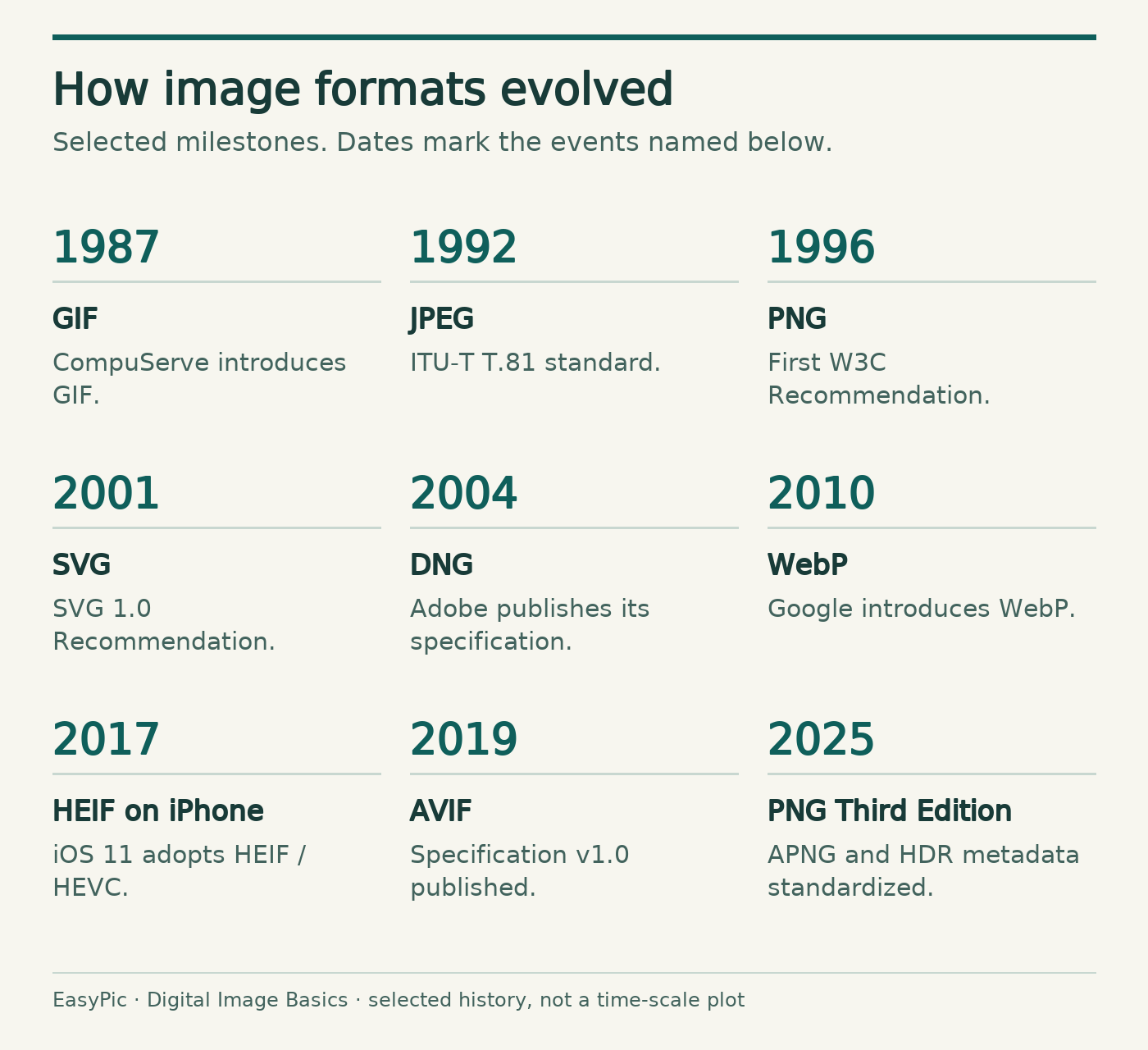
A newer standard does not automatically erase an older one. Software support, archival needs, editing features and the habits of millions of users all matter.
Seven formats you will see on websites and in everyday sharing
1. JPEG / JPG: the familiar photograph format
Origin: The Joint Photographic Experts Group; a foundational international still-image recommendation dates to 1992. Best known for: Widely compatible photographic images.
JPEG usually reduces file size by allowing some loss of visual information. This can work well for photographs with smooth color changes, but aggressive settings may introduce visible artifacts around small text, high-contrast lines or subtle textures. Standard JPEG has no alpha channel for smooth transparent cutouts.
JPG and JPEG generally refer to the same image format. The shorter .jpg extension reflects older filename conventions; it is not an inherently lower-quality version. For a real fixed-size example of what lossy encoding can do to tiny lettering, see our original small-text compression experiment.
2. PNG: lossless graphics and smooth transparency
Origin: The PNG development effort began in the mid-1990s; the first W3C Recommendation dates to 1996. Best known for: Screenshots, diagrams, pixel-accurate graphics and transparency.
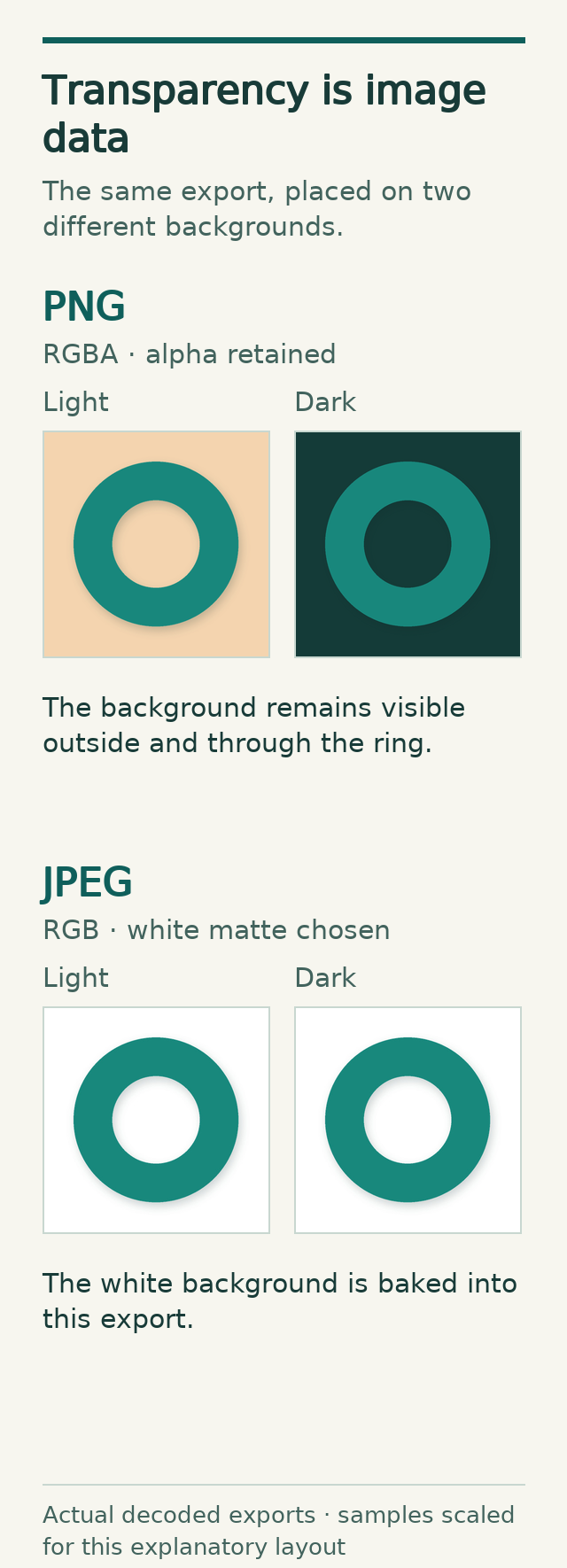
PNG preserves the reference pixel values supplied to its lossless encoder, making it useful when small labels, hard edges and alpha transparency matter. It may produce relatively large files for complex photographs. Converting an already damaged JPEG to PNG does not recover the information lost during the earlier save. For a batch handoff, our guide to converting PNG files to JPG or WebP explains an existing export workflow; check transparency before choosing an opaque result.
One modern twist: PNG should no longer be described simply as “a format that cannot animate.” The PNG Third Edition became a W3C Recommendation on 24 June 2025, incorporating the already deployed APNG animation chunks and HDR-related metadata. That date marks a standards update, not the invention of animated PNG. Whether a particular editor or service handles these features correctly is a separate question.
Inspect F2 at full size
This view keeps the selected image at its original dimensions. Focus the frame and use arrow keys to scroll.
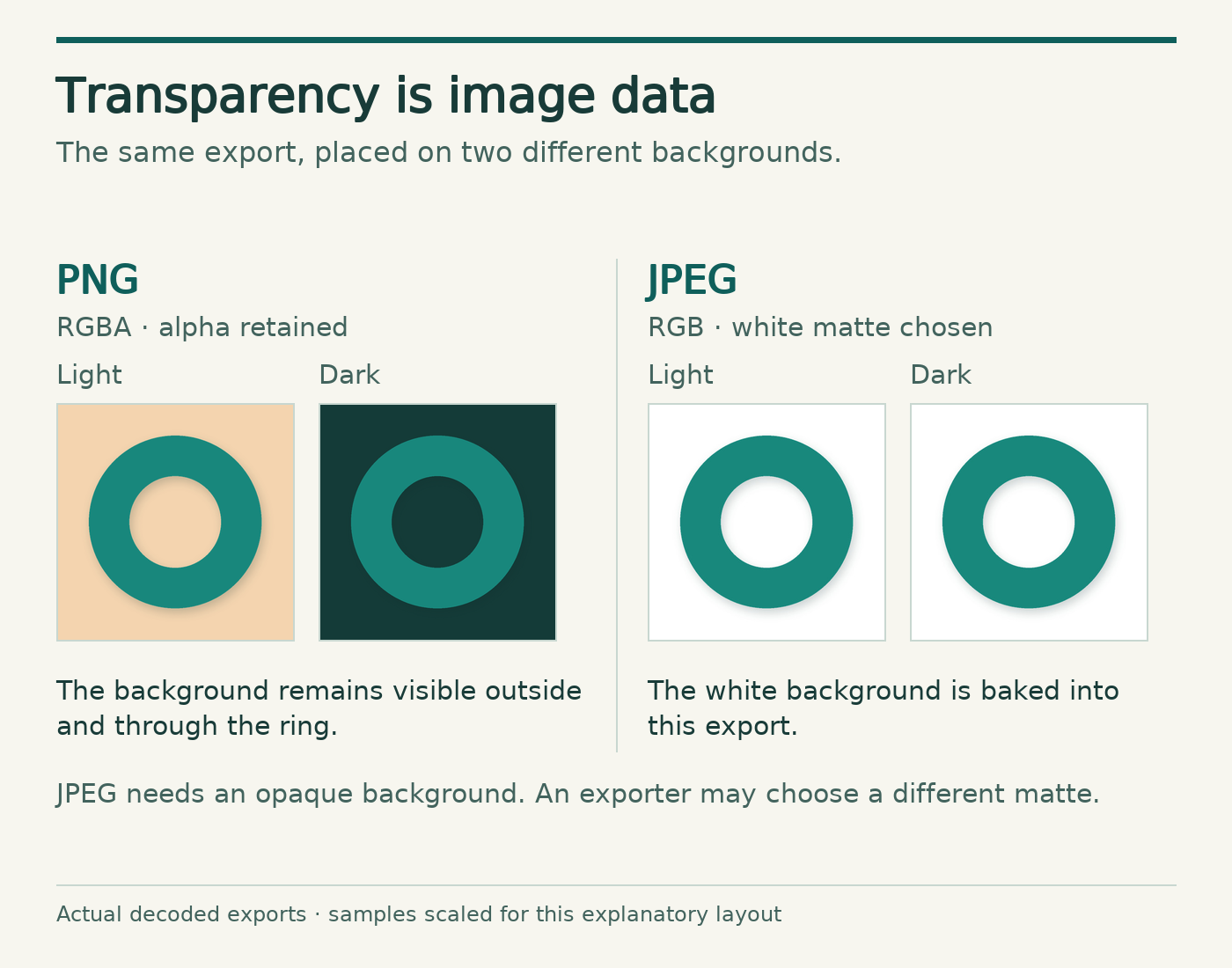
Native samples: PNG alpha export · JPEG white-matte export.


3. GIF: from dial-up graphics to internet reactions
Origin: Introduced by CompuServe in 1987. Best known for: Short, familiar looping animations.
GIF uses palette-based images, typically with up to 256 colors per frame. Its LZW compression can be lossless for the palette image, but converting a full-color photo to that limited palette can visibly change its colors. GIF supports basic transparency, not the same smooth partial-alpha transparency used for many modern cutouts. The GIF89a control extensions specify such details as frame delays and a transparent color index; the format’s 1987 introduction should not be confused with every later animation convention.
A social-media “GIF” is not necessarily delivered as an actual .gif file. Websites may use a video or another image format behind an animation-like interface.
4. WebP: Google's flexible web format
Origin: Google introduced WebP in 2010 to make web images more efficient. Best known for: Modern website photos, graphics and animation.
WebP supports lossy and lossless encoding, transparency and animation. This flexibility makes it useful for web production, but the best export depends on the actual artwork, settings and destination. Do not assume WebP always wins on quality or byte count; compare real files at relevant output sizes.
5. AVIF: modern compression and advanced image capabilities
Origin: Developed through the Alliance for Open Media; AVIF specification v1.0 was published in 2019. Best known for: Modern web imagery, including workflows that need HDR, transparency or efficient compression.
AVIF stores AV1-coded imagery using the HEIF container framework. It supports both lossy and lossless modes, high dynamic range, wide color gamut, transparency and animation. It can be a strong option for image-heavy sites, though encoder settings, processing time and application support still need attention. A brand's upload form may accept JPEG or WebP but reject AVIF; test your actual publishing environment.
6. SVG: pictures described as shapes, not a fixed pixel grid
Origin: The World Wide Web Consortium published SVG 1.0 as a Recommendation in 2001. Best known for: Logos, icons, diagrams and scalable interface art.
SVG is different from a typical photograph file. It describes artwork through vector geometry and other XML-based instructions, allowing many shapes and lines to scale cleanly. Complex photographic detail is generally better handled by raster formats. SVG can also contain text and embedded raster images: an embedded photograph does not gain unlimited detail merely because it sits in an SVG file. Because SVG is a document format capable of more than simple pixels, websites should apply appropriate security rules before accepting or displaying untrusted SVG uploads.
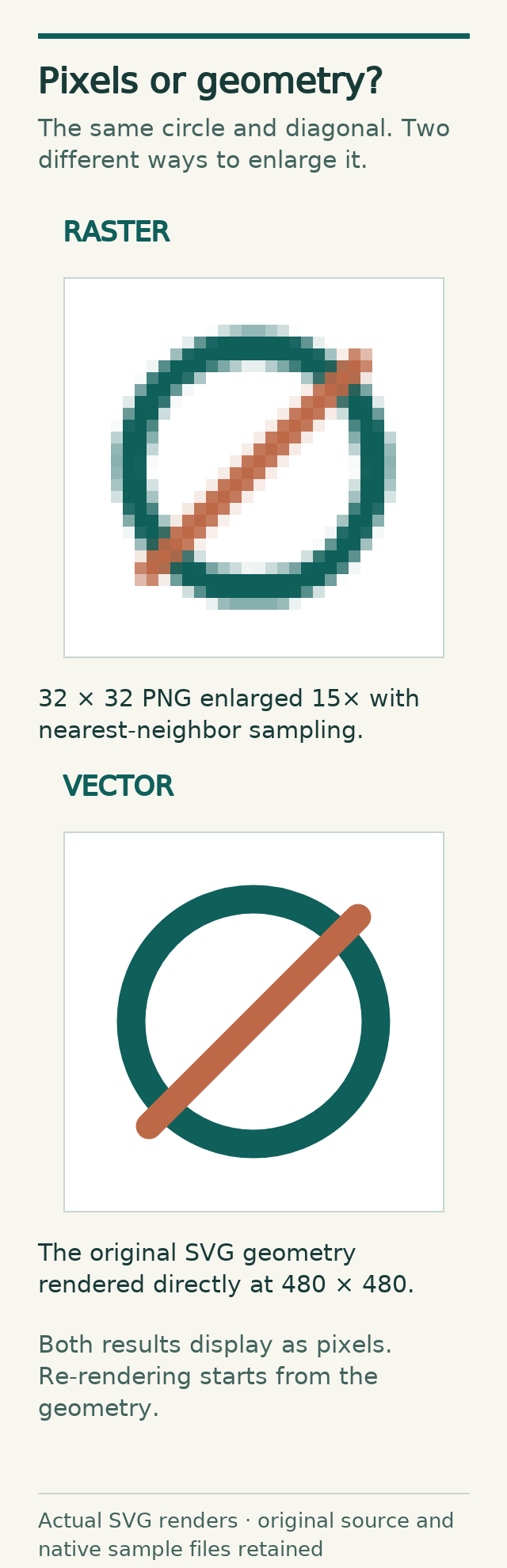
Inspect F3 at full size
This view keeps the selected image at its original dimensions. Focus the frame and use arrow keys to scroll.
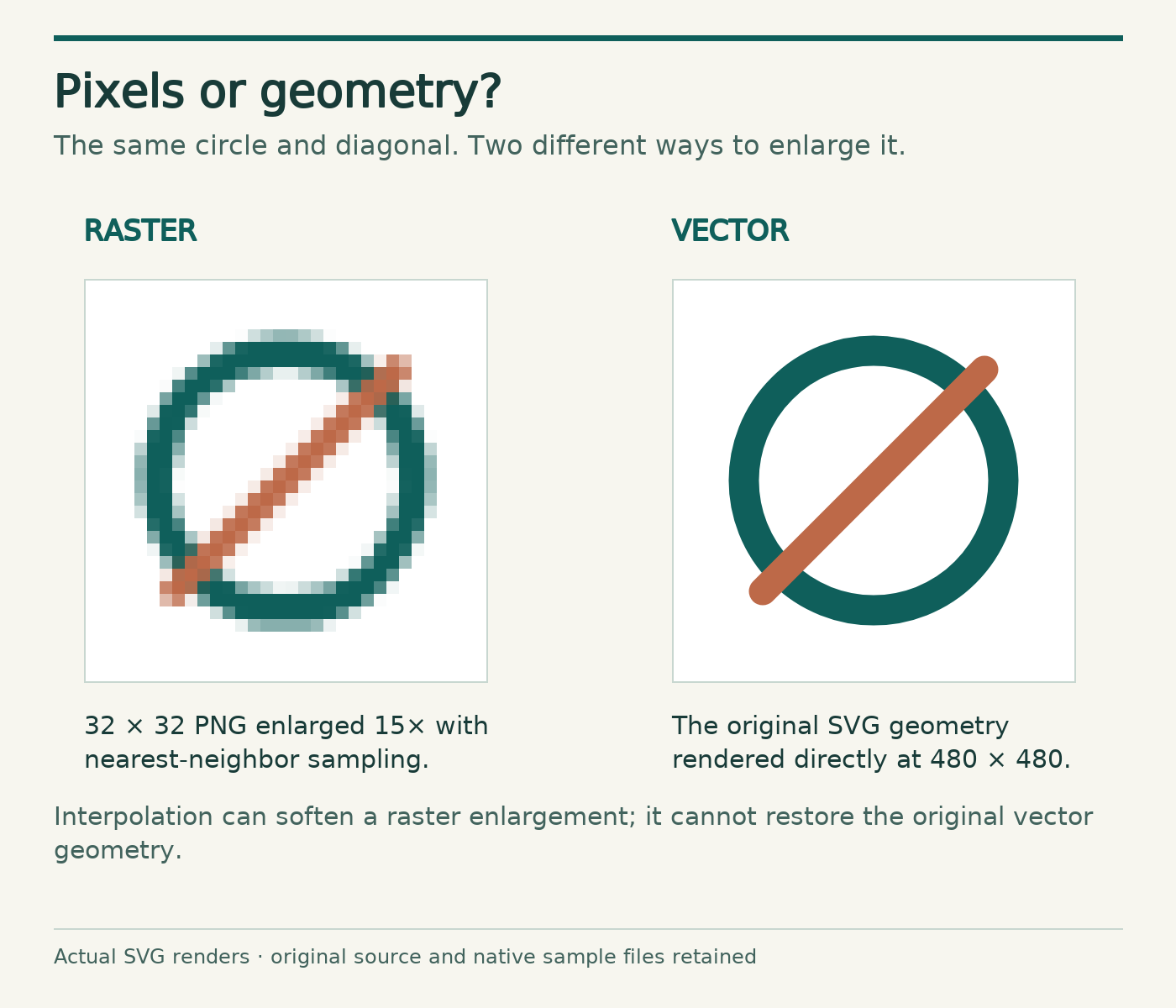
Native samples: 32px raster · 480px vector render · authored SVG geometry.



7. APNG: animated PNG, not just GIF with a new name
Origin: Developed as an extension of PNG; its animation model was formally incorporated into the 2025 PNG Third Edition. Best known for: Animations that benefit from PNG-style color and transparency.
APNG adds animation chunks to PNG to store a sequence of raster frames. A PNG decoder that does not understand the animation can ignore those ancillary chunks and display the default static image. It is useful when a loop needs more nuanced transparency or color than a palette-based GIF normally provides. Some software treats an animated PNG as a still image, so verify playback in the app or website where it will appear.
Seven more formats for photography, print, editing and icons
8. HEIC / HEIF: efficient photo storage on phones
Origin: HEIF is a high-efficiency image-file framework; Apple's iOS 11 popularized HEIF photos encoded with HEVC, commonly using the .heic extension. Best known for: Space-efficient photo storage on compatible phones and computers.
HEIF is a codec-independent container framework, while HEIC commonly denotes HEIF imagery using HEVC compression. AVIF uses that broader HEIF framework with AV1 coding instead. The terms are related but not interchangeable in every technical context. HEIC can help save device storage, but compatibility remains a practical issue when transferring photos to older software or certain web upload forms.
9. TIFF: a long-standing format for scans and print workflows
Origin: Developed by Aldus in the desktop scanning era; an early TIFF specification appeared in 1986. Best known for: Scanning, publishing, imaging archives and specialized professional handoffs.
TIFF is flexible: files can use different compression methods, bit depths and image representations. It is not automatically uncompressed or always lossless. The flexibility is valuable in controlled professional workflows but adds complexity and often more storage overhead than an ordinary web photo needs.
10. BMP: straightforward Windows bitmap storage
Origin: Associated with early Microsoft Windows and OS/2 bitmap graphics. Best known for: Legacy desktop applications and straightforward raster interchange.
BMP images are often uncompressed, although the format family supports multiple versions and certain compression options. Its simple structure helped older software handle bitmaps, but it is rarely a practical first choice for public web images today.
11. Camera RAW / DNG: keeping more editing latitude
Origin: Digital camera makers developed their own sensor-oriented RAW families; Adobe DNG, whose first public specification dates to September 2004, was created as a more openly documented option for storing camera raw data. Best known for: Photography workflows where later tonal, color and exposure-related decisions matter.
“RAW” is not a single universal file extension. You may encounter .cr3, .nef, .arw, .dng and others, depending on the camera and workflow. RAW files are often a starting point for editing, not the best format to email to a client or upload to a product page. Export an appropriate delivery copy while keeping the original capture file.
12. PSD: a project, not merely a flattened picture
Origin: Adobe Photoshop's native document family. Best known for: Editable design projects with layers, masks, text and effects.
A PSD can preserve the parts of a design so they remain independently editable. That is valuable when a colleague needs to change a product label or reposition an element. But for broad compatibility, a finished artwork is commonly exported as PNG, JPEG or another suitable delivery file. A PSD is not a replacement for a website-ready image.
13. JPEG XL: modern image coding with version-dependent support
Origin: Developed through the JPEG standards community as a modern image coding system. Best known for: Advanced imaging capabilities in compatible software workflows.
JPEG XL (.jxl) provides lossy and lossless coding, but a familiar name does not make it interchangeable with ordinary JPG files. Compatibility checked 14 November 2026: decoding is documented in Safari 17 and later, Chrome 155 and later and Firefox 158 and later. These versioned decoding statements do not guarantee identical feature support, JPEG XL export, or acceptance by every editor and upload form. Test the receiving workflow and provide a JPEG, PNG, WebP or AVIF fallback for clients that need it.
14. ICO: why a tiny website icon has its own file type
Origin: Part of the Microsoft Windows icon-resource ecosystem. Best known for: Application icons and traditional browser favicons.
An ICO file may contain multiple images at different dimensions or color depths so a program can choose a suitable icon size. The format is specialized: it is helpful for a favicon or Windows shortcut, not for storing a high-resolution photograph. Modern websites may also provide PNG or SVG icons where supported.
Which image format is best for your actual project?
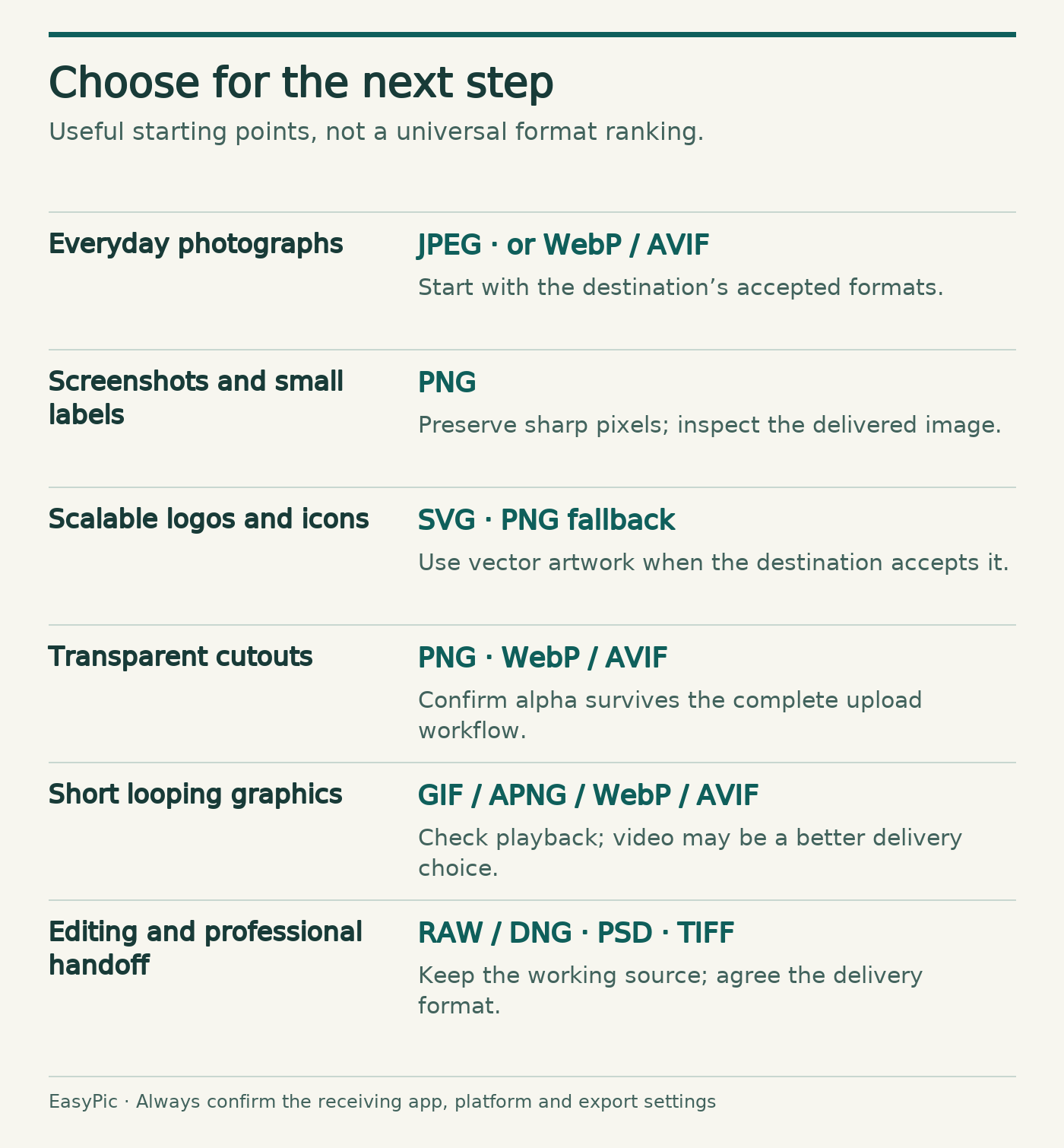
A useful choice starts with the destination:
- Sharing an everyday photo: Start with JPEG for broad compatibility. Compare WebP or AVIF if the destination supports them and size matters.
- Publishing a screenshot with text: PNG is a reliable starting point. Inspect the delivered image if a platform resizes or recompresses it.
- Designing a logo or sharp scalable icon: Use SVG when the platform accepts it; export PNG or another raster fallback as needed.
- Preparing a transparent product cutout: PNG is familiar and reliable; WebP/AVIF may also work if transparency and compatibility are confirmed.
- Making a small looping animation: Consider GIF for legacy reach, or APNG, animated WebP, AVIF or video depending on quality and platform requirements.
- Editing a professional photo: Keep your camera RAW/DNG source, and export a separate file for delivery.
- Handing off layered artwork or print images: PSD and TIFF may be appropriate in agreed professional workflows, but confirm the recipient's software requirements.
Never choose solely from a claim that one format is universally “best.” The same format can produce very different results at different settings. File-size and image-quality comparisons should be grounded in actual exports, not generalized percentages borrowed from unrelated samples.

Inspect F4 at full size
This view keeps the selected image at its original dimensions. Focus the frame and use arrow keys to scroll.
Frequently asked questions about image file types
Is JPG the same as JPEG?
Usually, yes. .jpg and .jpeg normally refer to the same familiar JPEG image encoding, with the shorter extension reflecting older filename conventions. Renaming the extension does not change the encoded content.
Is PNG better than JPG?
Not universally. PNG is lossless and useful for transparency, screenshots and sharp graphics. JPEG is often smaller for photographs at an acceptable visual quality. Use the one that best suits the source and destination.
What is the difference between WebP and AVIF?
Both are modern image formats designed for efficient delivery. Both can support transparency and animation, but they use different underlying compression systems and can vary in encoding cost, appearance and app support. Test both with the same source and realistic size or quality constraints before selecting one.
Why are some iPhone photos HEIC instead of JPG?
Compatible Apple devices can capture HEIF/HEIC images for efficient storage. If another app does not accept the file, a real conversion to JPEG may be needed. The file extension alone should not be changed as a substitute for conversion.
Can PNG be animated?
Yes, APNG provides animation in the PNG family, and the W3C's PNG Third Edition included animated PNG in 2025. However, not every image editor, CMS or upload service will preserve or play APNG correctly.
Which format is best for a website logo?
SVG is often a good choice for a logo built from vectors, because it can scale cleanly. PNG can be an appropriate raster alternative, especially when the destination does not accept SVG. Use suitable sanitization and security rules for untrusted SVG files.
Does converting a JPEG to PNG improve its quality?
No. A PNG can preserve the pixels it receives without adding new lossy compression, but it cannot recreate details already discarded in the JPEG. Keeping a high-quality original source is more useful than converting an already degraded copy.
A practical way to remember the difference
Image formats are less like a competition to find the one perfect file and more like a set of specialized containers and tools. JPEG made photo sharing practical. PNG gave web graphics lossless storage and transparency. GIF survived as a cultural shorthand for motion. WebP and AVIF push modern web delivery further. SVG describes shapes instead of fixed pixels, while HEIC, TIFF, RAW, PSD and the others serve different capture, editing and production needs.
If you remember only one rule, remember this: choose a format for what you need to do next, not just for the extension you recognize.
Sources and further reading
Sources below document format capabilities and/or histories. Facts and compatibility checked 14 November 2026. They do not establish specific keyword search volume or a universal ranking of compression efficiency.
- MDN — Image file type and format guide
- ITU-T — Recommendation T.81, JPEG (1992)
- Library of Congress — GIF 89a
- W3C — First PNG Recommendation (1996)
- W3C — PNG Third Edition (2025)
- Google — WebP's introduction (2010)
- Alliance for Open Media — AVIF overview
- Alliance for Open Media — AVIF v1.0 (2019)
- W3C — SVG 1.0 announcement (2001)
- Apple — HEIF and HEVC on Apple devices
- Apple Developer — High Efficiency Image File Format
- Library of Congress — TIFF Revision 6
- Library of Congress — BMP v5
- Adobe — Digital Negative (DNG)
- Adobe — Photoshop image file formats
- JPEG — JPEG XL specifications
- Microsoft — About icons
- Greg Roelofs — History of PNG, a contributor account
- CompuServe — GIF89a original specification
- Google — WebP container specification
- W3C — SVG1.0 dated Recommendation
- Nokia — HEIF technical information
- Adobe — Photoshop file format specification
- Google — Shipping JPEG XL in Chrome155
- Mozilla — Firefox158 release notes
- WebKit — Safari17 image-format support
Disclosure: These original diagrams and this editorial revision were prepared with AI assistance. The transparency and scaling comparisons use actual generated sample files, as explained in their captions. They illustrate capabilities and rendering methods; they are not a comparative format-performance benchmark.